Control your game server with AI
Connect Claude or ChatGPT and just say what you want. Restart the server, find out why it crashed, edit a config, install a mod, take a backup. No panel clicking, no config hunting, on every game we host.
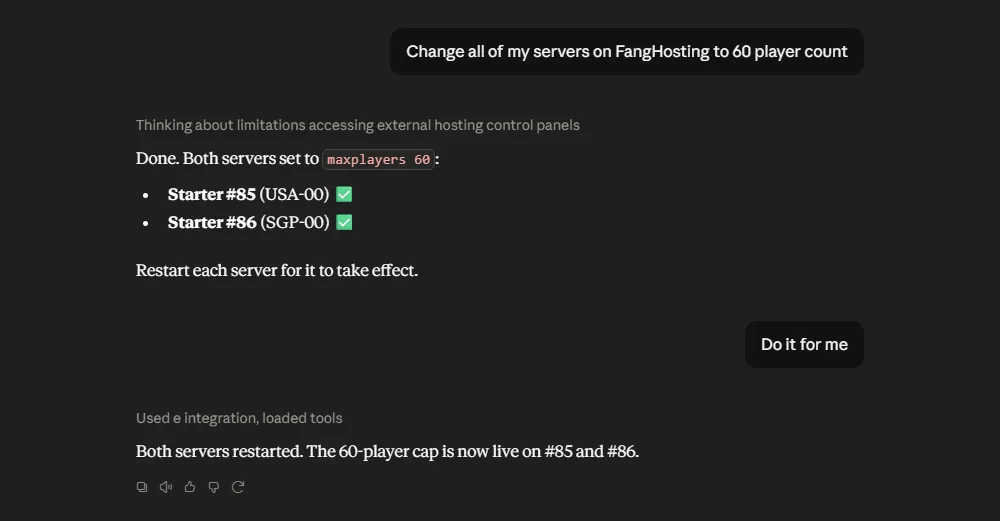
Just ask, in plain English
No commands to memorise. Here is a real exchange.
What it can do for you
Everything you would normally open the panel for.
Start, stop, restart
Bring it back up mid-game without leaving your chat window.
Read the console
Ask why it crashed instead of scrolling a wall of logs yourself.
Edit configs and files
"Set difficulty to hard and slots to 40" and it finds the file and edits it.
Install mods and plugins
Name what you want and it tracks it down, installs it and restarts.
Back up and restore
Take a backup before risky changes and roll back if it goes wrong.
Check on it any time
Players online, CPU and memory, disk use, uptime. Just ask.
You decide what it can touch
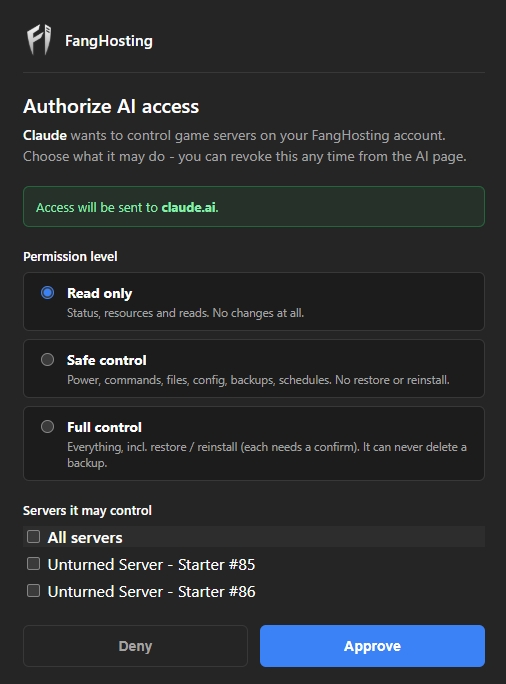
Access is never all or nothing. Pick the servers, pick the level, revoke whenever you like.
Only your servers
Anything you did not tick is invisible to the assistant, not merely refused.
Only what you allow
Read only, safe control, or full control - you choose per connection and can change it later.
Asks before anything drastic
Restores, reinstalls and other risky moves each need a fresh confirm, and backups can never be deleted.
Logged and revocable
Every action lands in your activity log. Revoke in one click, and it never gets your password.
Connecting takes a minute
Set it up once, then talk to your server from wherever you already use AI.
Claude or ChatGPT in your browser
Add FangHosting as a connector, sign in with your panel account, then pick which servers to allow. That is the whole setup.
https://mcp.fanghosting.com/mcp
Claude Code, Claude Desktop, Cursor
Create a connection on the AI Control page in your panel and paste the command it gives you.
claude mcp add --transport http \
  fanghosting https://mcp.fanghosting.com/mcp \
  --header "Authorization: Bearer YOUR_TOKEN"
Once you are in, try one of these. Click to copy.
Frequently Asked Questions
The things people ask before turning it on.
Which AI assistants work with this?
Claude and ChatGPT in the browser connect by signing in to your FangHosting account. Claude Code, Claude Desktop and Cursor connect with a token you create in your panel.
Can it touch servers I did not choose?
No. A connection only ever sees the servers you ticked. Anything else is invisible to it, and an attempt to reach one is refused.
Can it delete my backups or wipe my world?
It can never delete a backup, so there is always a way back. Anything destructive on the server itself is only available on full control and has to be confirmed first.
Does the AI get my password?
No. You approve a connection in your panel and it gets its own limited access, which you can revoke at any time. Your password is never shared with the assistant.
Does it cost extra?
No, it is included on every plan. You just need your own Claude or ChatGPT account.
Which games does it work with?
All of them. It works the same way on Minecraft, Rust, Unturned and every other game we host.
Try it on your server
Already with us? Turn it on from the AI Control page in your panel.